
Instagram song finder
Paste a Reel or video post link and get the song behind it — even when Instagram only shows “original audio”.
 The clip you saved
A little summer, on repeat.
original soundYour song, found

Afterglow
Coastline · Late summer
Illustrative result · fictional song & artwork
Find the song in an Instagram Reel
- 01
Copy the Reel's link
Tap the paper-plane or ⋯ menu, then Copy link. Links to /reel/, /reels/ and /p/ posts all work.
- 02
Paste it above
We fetch the Reel's video, cut 12 seconds of its soundtrack and match it against tens of millions of songs.
- 03
Get the song
See the title and artist, plus album details, cover art and a preview when available. Use the listening links to search on Spotify, Apple Music or YouTube, and save the result link for later.
A real Instagram example
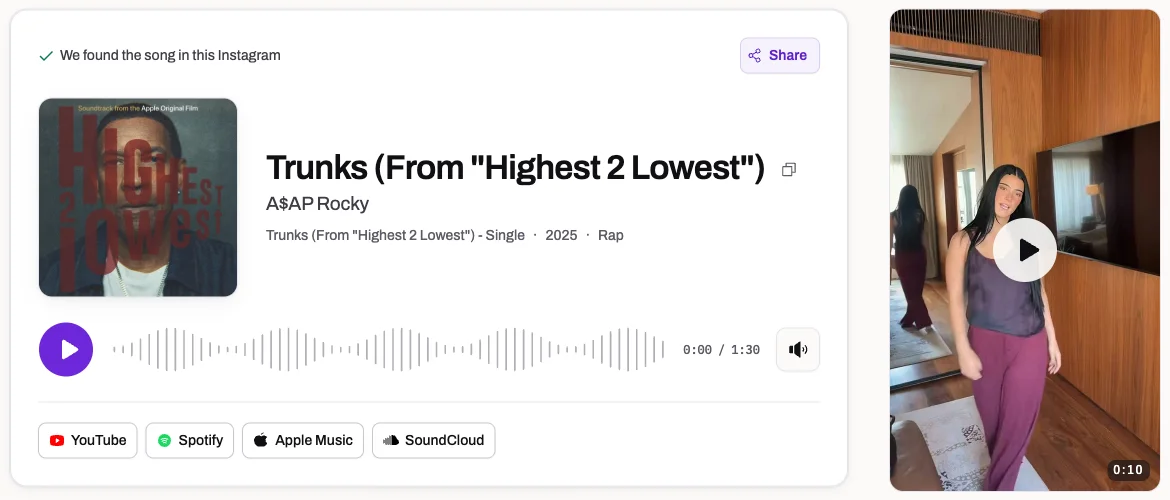
The music in this Milan Reel was identified as “Trunks (From "Highest 2 Lowest")” by A$AP Rocky. The result pairs the original video with the song details and links to listen.
View this Instagram resultReels, video posts and carousels
Beyond “original audio”
Lots of Reels relabel a real song as “original audio”. We identify the music in the sound itself.
Carousel posts
In a post with several slides we listen to the first video in it.
Instagram's label, side by side
When Instagram names the track, we show its label next to the song we heard.
No Instagram login
Works for public posts without signing in to Instagram or installing anything.
Reel, post and short links
Links to /reel/, /reels/ and /p/ posts are all accepted, so you can paste whichever one Instagram gives you.
Popular Reels answer instantly
A Reel someone has already identified opens straight away.
If a Reel only says “original audio”, the audio page and comments may offer clues. Follow our guide to finding a song from an Instagram Reel for the steps.
Look beyond the Instagram audio label
Use the audio page as a clue
An Instagram Reel may show a released song title, an account name or “original audio”. That label describes the sound attached to the post and does not always identify the music mixed into the video. Tap the label first: it may lead to a named recording or to other Reels using the same sound. The creator's caption and pinned comments are also worth checking for a track credit.
When the label gives no useful name, ClipMelody checks the Reel's actual audio. The Milan example above matched Trunks by A$AP Rocky; its result shows the video alongside the song details. Use the available preview and listening links to compare the recording with what you heard. An edited sound may lead back to its original recording rather than to a separately released version of that exact edit.
Public access is different from viewing in your app
A post can play normally for you because you follow the creator or are signed in, while remaining inaccessible to a service fetching the public link. Check that you copied the individual Reel or video post, not a profile address. Opening it in a signed-out browser can help reveal an access restriction, though being public still does not guarantee that Instagram will let an outside service fetch it.
If the link cannot be read and you already have the video, identify the music from the saved file. This avoids depending on the post remaining reachable. Check the recording's sound before uploading: a moving picture without audio cannot be recognized. A screenshot of the Reel, its cover or its sound label also lacks the recording needed for audio fingerprinting.
Choose the right source for carousels and Stories
Reels and ordinary video posts can use a direct post link. A carousel is different because one post may contain several videos with different soundtracks. ClipMelody listens to the first video in that carousel. If the song you want belongs to a later slide, the post link may return a valid answer for another video. Save the relevant clip and upload it separately so the intended music is near the beginning.
Stories do not provide a usable public post link for this tool. If you have a saved Story or a screen recording with sound, use the file upload route instead. MP4, MOV and WebM video files are supported, with a 50 MB video limit; audio uploads can be up to 25 MB. A short clip containing the wanted passage is enough to try, without uploading a whole sequence of unrelated Stories.
What to try when the music is not found
If the Reel loads but no song matches, listen for a section with fewer spoken words, transitions or effects. Very quiet background music may be masked by narration, while a sped-up edit or remix can differ too much from a catalogue recording. A clearer saved excerpt is a useful next attempt. Repeating the same unchanged source does not add information for the recognizer.
For a live cover or a creator's unreleased music, the comments and creator's profile may be more helpful than another audio search. You can also search clearly heard lyrics and compare the artist's released versions. Finding the song is free; seeing its name uses one credit on your ClipMelody account. A no match does not use a credit.
Instagram song finder FAQ
How do I find a song from an Instagram Reel?
Copy the Reel's link and paste it into the box above. ClipMelody listens to the Reel's audio and names the song.
Why does the Reel say “original audio”?
The creator used their own recording of the sound rather than picking a track from Instagram's library. If a released song is playing in it, we can usually still find it.
Does it work with private accounts?
No — we can only listen to public posts. If you have the video saved, upload the file instead.
What about Instagram Stories?
Stories can't be linked to publicly. Save or screen-record the story and upload the file.
Is it free?
Finding the song is free; seeing its name uses one credit.
Why can I hear music but get no match?
Speech or effects may hide the recording, or an edited, live or unreleased version may not be in the catalogue. Try a clearer saved excerpt with the music near the start. No credit is used without a match.
Can I find a song from an Instagram link online?
Yes. Copy the link from the Reel, paste it into the box above in any browser and press the arrow. There is nothing to install.
How does an Instagram Reel song finder work?
It takes a short slice of the Reel's audio, makes a fingerprint and compares it with tens of millions of recorded songs, so the “original audio” label doesn't get in the way.
Can I find a song by video link instead of a screenshot?
Yes. A link is all you need. If you only have the video file, upload it instead.
How do I listen to the whole song?
Tap Spotify, Apple Music or YouTube under the result to open a search for the song, then pick the right track to play it in full.
Find the song in that Reel
Paste an Instagram link and press the arrow.
Free to find · no app · no Instagram login