
Identify background music in a video
Upload a clip or paste a link and find the song playing in the background — even under talking.
Drop an audio or video file hereUpload an audio or video file
MP3, M4A, WAV, OGG, MP4, MOV, WebM · up to 25 MB audio or 50 MB video
 The clip you saved
Everyday moments. Great music.
original soundYour song, found

Afterglow
Coastline · Late summer
Illustrative result · fictional song & artwork
Name the music behind any clip
- 01
Upload the clip or paste a link
Drop an MP4, MOV or audio file, or paste a TikTok, Instagram or YouTube link.
- 02
We sample the soundtrack
ClipMelody extracts the audio and checks the start first. If no song is found, it may check more clips within the first minute and the middle of longer files.
- 03
Get the track
See the title and artist, plus album details, cover art and a preview when available. Use the listening links to search on Spotify, Apple Music or YouTube, and save the result link for later.
A real background music example
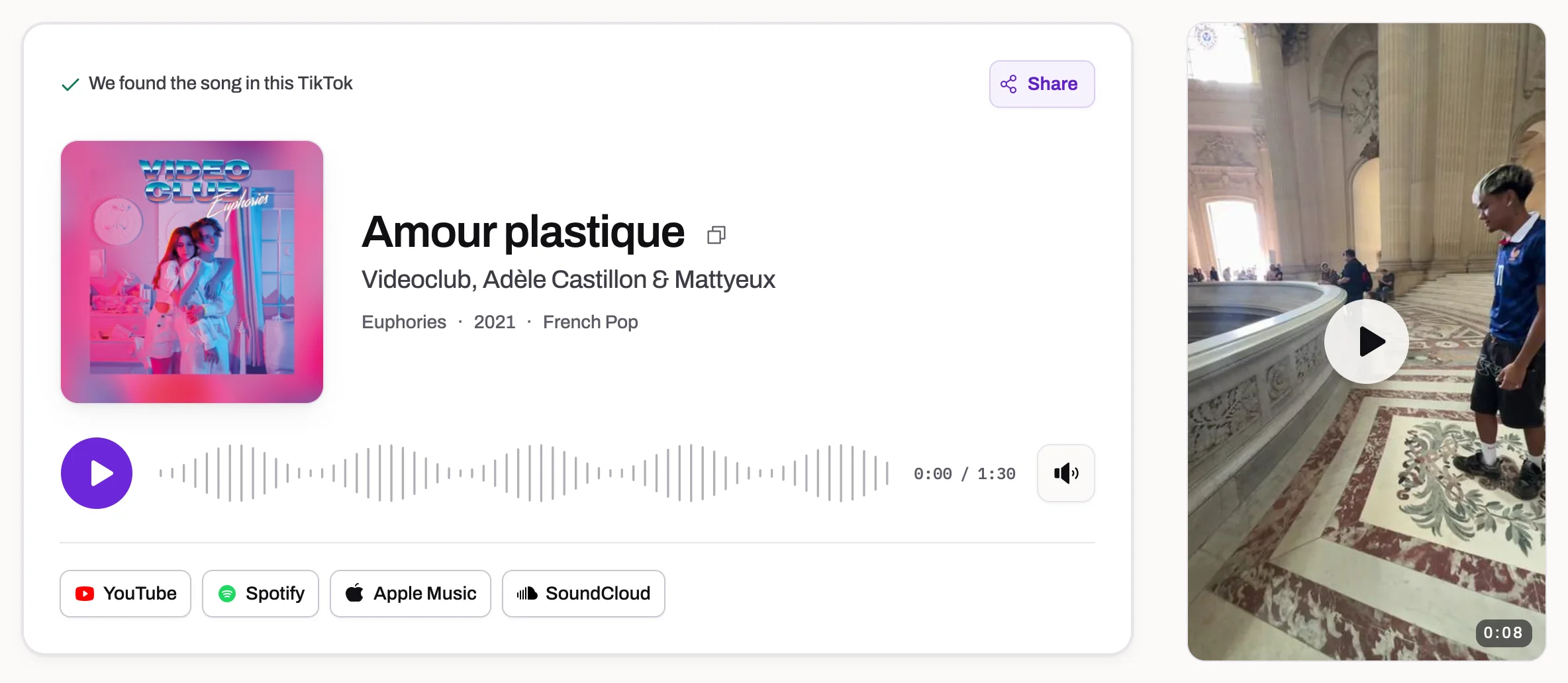
ClipMelody found “Amour plastique” by Videoclub, Adèle Castillon & Mattyeux in this Paris video, whose audio is labelled “original sound”.
View the song detailsFor videos with music under everything else
Music under a voice-over
Background music is often quieter than the narration. If it's clearly audible, it can usually be matched.
Your own files
Screen recordings, downloaded clips and phone videos — up to 50 MB of video or 25 MB of audio.
Checks short sections
If the opening does not match, we may check more audio within the first minute and, for longer files, a clip from the middle. Music must still be audible beneath speech.
Private by default
Uploads are used only to identify the song and are deleted automatically within a day.
Give the background music a clear moment
Choose a link or a file with the music you need
If you still have the public post, use the TikTok song finder, Instagram song finder or YouTube song finder to paste that platform's link. A saved video, voice recording with music in the background or screen recording can go straight into the upload tab. Choose a file that contains the sound itself: a screenshot, an album cover or a video with a muted soundtrack gives the recognizer nothing to compare.
Video uploads can be up to 50 MB and audio uploads up to 25 MB. Supported formats include MP4, MOV, WebM and MKV video, plus MP3, M4A, WAV, OGG and FLAC audio. You do not need to extract audio before sending a supported video. If the file is too large, trim it to the section containing the song or export a smaller copy while keeping the audio clear. Renaming a file's extension does not convert its format.
Pick a continuous passage with less speech
Listen to the clip before uploading and find a moment where the music is easiest to hear. A gap between spoken sentences, a musical intro or a scene without sound effects may work better than the loudest part of the video. Keep a continuous passage with a recognizable rhythm or melody rather than joining several tiny snippets. If you can barely hear the music yourself, the recording may not contain enough detail for a reliable match.
ClipMelody checks a short sample at the beginning first. If needed, it may try more sections within the first minute and the middle of longer files, but it does not scan every second or return a complete soundtrack list. Put the wanted song near the start of a trimmed file for a more direct attempt. YouTube links are limited to audio near the beginning; upload a saved excerpt when the music appears later.
Identifying a song does not separate the soundtrack
The tool compares recorded audio with a music catalogue to find a title and artist. It does not remove a speaker's voice, isolate an instrumental, clean up background noise or export the music as a separate track. A recognizable song may still match underneath narration, but speech and effects can also hide the details that fingerprinting needs. Raising the overall volume raises both the music and the competing sound, so it does not necessarily help.
A match can identify the original recording behind a slowed edit, but it may not name that exact variation. Conversely, a live performance or cover may sound familiar to you while differing from the recording in the catalogue. Stock music and independent releases can match when the recording is included; an unreleased cue or a custom score may have no entry. No match means the sampled audio did not produce an answer, not that the clip contains no music.
Compare the result and decide what to do next
On a match, check the song title and artist against the passage you meant to identify. Album details, cover art and a preview appear when available. The listening links open searches on music services, where you can choose the right recording. The Paris video example above shows Amour plastique identified from a social video; it illustrates a real result rather than an uploaded-file demonstration. You can open that existing result without starting a new identification.
Finding a song is free. Unlocking a matched song uses one credit; a no match or a failed run costs nothing. Check current packs and plans if you need credits. Uploaded source files are automatically deleted within a day. If nothing matches, try a clearer excerpt or check the video's description, comments and music credits. Finding a title does not grant permission to reuse the recording, so creators should check the track's licensing separately before publishing their own video.
Background music FAQ
How do I find the background music in a video?
Upload the video file or paste its link above. ClipMelody cuts a clip of the soundtrack and matches it against tens of millions of songs.
Can it find music that's quieter than the talking?
Often, yes. If you can clearly hear the song yourself, fingerprinting usually can too. Very faint music under loud speech may not match.
The song plays late in my video — will it be found?
We start at the beginning and may check more clips within the first minute and the middle of longer files if needed. If the song plays elsewhere, trim the video to that part and upload it.
Can it identify royalty-free or stock music?
Only when the track is in a commercial catalogue. Much library and stock music isn't, so it may come back as no match.
What file types are supported?
MP4, MOV, WebM and MKV video, and MP3, M4A, WAV, OGG and FLAC audio.
Find the music in your clip
Upload a file or paste a link.
Drop an audio or video file hereUpload an audio or video file
MP3, M4A, WAV, OGG, MP4, MOV, WebM · up to 25 MB audio or 50 MB video
Free to find · files deleted within a day