YouTube song finder
Paste a YouTube Shorts or video link and find out what song is playing — title, artist and where to listen.
 The clip you saved
One more song.
original soundYour song, found

Afterglow
Coastline · Late summer
Illustrative result · fictional song & artwork
Name the song in a YouTube Short
- 01
Copy the Short's link
Tap Share → Copy link in the YouTube app, or copy the address from your browser. youtube.com/shorts, watch?v= and youtu.be links all work.
- 02
Paste it above
We read the video's audio stream, cut a clip and match it against a catalogue of tens of millions of songs.
- 03
Open the song
See the title and artist, plus album details, cover art and a preview when available. Use the listening links to search on Spotify, Apple Music or YouTube, and save the result link for later.
A real YouTube example
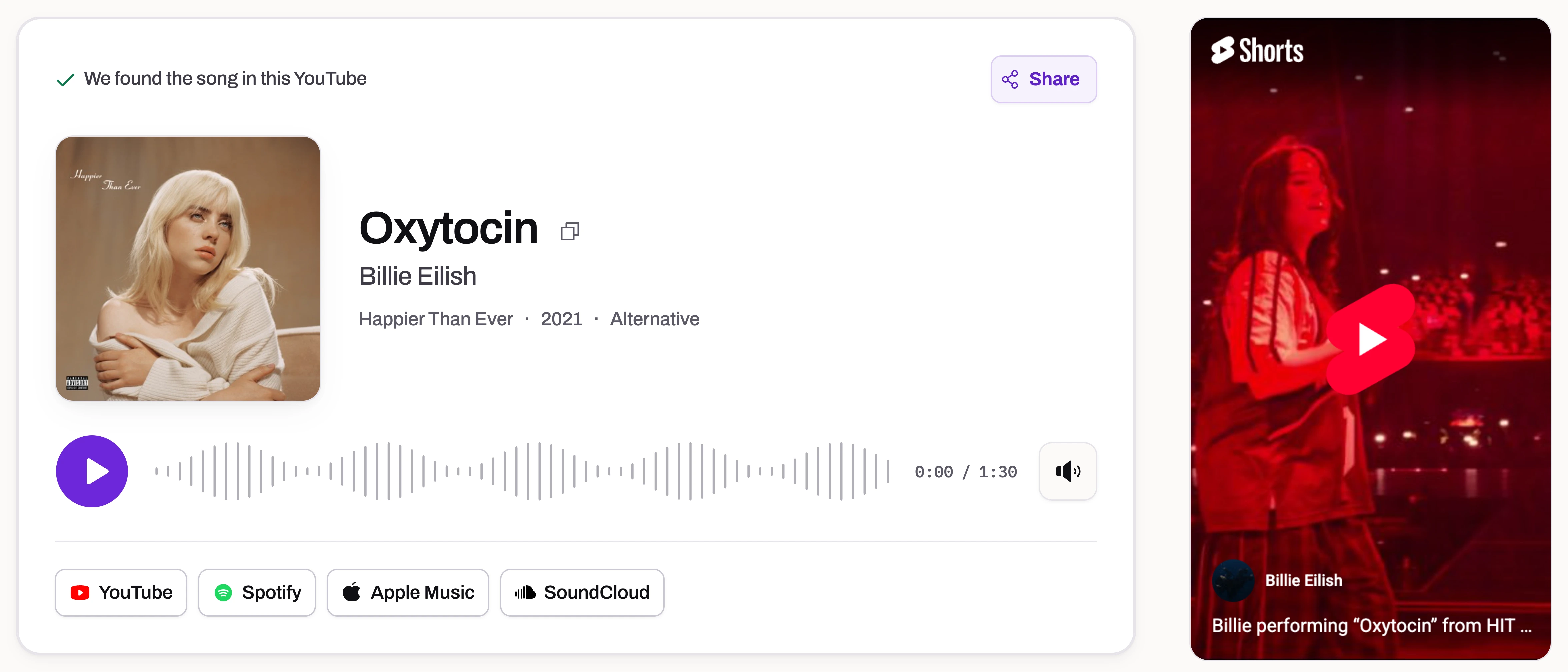
ClipMelody identified “Oxytocin” by Billie Eilish in this YouTube video.
View this YouTube resultMade for Shorts, works for videos
Shorts and regular videos
Public Shorts and video links are supported; recognition checks audio near the start and depends on the video's availability.
Background music under talking
If the song is audible under a voice-over, it can usually still be matched.
The video stays on the page
Watch the Short next to its result to check you've got the right track.
Share the answer
Every result has its own link — send it to the friend who asked “what song is this?”.
Short links included
youtu.be links, youtube.com/shorts/ links and regular watch?v= addresses all work, so you can paste whatever you copied.
Popular videos answer instantly
A video someone has already identified opens straight away.
Match the part of the YouTube video you mean
Shorts and long videos need different choices
In a Short, the song often begins alongside the first frame, so a video link is a convenient starting point. In a tutorial, vlog or compilation, the soundtrack may change several times. Before you paste the link, note where the song begins and whether there is music in the opening. This helps you tell whether the answer belongs to the intro or to the part you actually wanted.
ClipMelody reads roughly the first minute of audio from a YouTube link. It starts with a short sample and may try more of that opening audio if needed; it does not listen through an entire long video. If your song starts ten minutes into a travel vlog, use a saved clip of that section and upload it for background music identification. Keep the wanted song near the start of that file.
A timestamp does not select the audio
A YouTube share link can include a timestamp that tells a video player where to begin playback. ClipMelody uses the video ID from that link, so a timestamp does not tell the song finder to start there. Pasting a link marked at 2:30 still checks the opening audio. There is currently no time-range selector for a YouTube link on this page.
For a later song, trim a copy of the relevant section with a video or audio editor before uploading. Listen to the exported file and check that it contains the music, not just a silent screen recording. You do not need a full-resolution copy of the whole video to identify a short passage. Supported uploads include MP4, MOV and WebM video, or MP3, M4A and WAV audio.
Use the description and music credits as clues
Before running a search, expand the video's description and look for a track list, music credits or a creator's source link. A pinned comment may also answer questions about the soundtrack. For a compilation, note the time beside each listed track and compare it with the part you heard. Credits can give you the exact version even when the recording has been edited heavily in the video.
If those clues do not name the song, audio identification can help without relying on the video's title. The example above identified Oxytocin by Billie Eilish from the video's audio. Open that result to see how a source video and a matched recording appear together. It is one verified example, not a promise that every live performance, cover or newly uploaded song will be recognized.
Check the answer when several songs appear
A result names a recording heard in the sampled audio; it is not a list of every song used throughout a video. If an intro and a later scene use different tracks, an accurate match for the intro may still be the wrong answer for your question. Compare the artist, title and available preview with the passage you had in mind before saving the song.
If the video cannot be read, confirm that it is public and available outside your signed-in account. Private, restricted or unavailable videos need a saved file you can upload. If the audio is read but no song matches, try a clearer passage with less speech. Unreleased music, a live cover or a heavily changed recording may not be in the catalogue. Finding the song is free; only unlocking a match uses a credit.
YouTube song finder FAQ
How do I find a song in a YouTube Short?
Copy the Short's link (Share → Copy link) and paste it into the box above. ClipMelody listens to the audio and tells you the song.
Does it work with long YouTube videos?
Yes, for the music near the start of the video. If the song you want plays much later, download that part and upload it instead.
Can it identify live performances or covers?
Sometimes. Fingerprinting matches recordings, so a live version or cover that sounds different from the studio track may not match.
Why didn't it work for this video?
Private, age-restricted and live-stream videos may be unavailable. If the audio is read but no song matches, the music may be too quiet, heavily altered or absent from the catalogue.
Is it free?
Finding the song is free; seeing its name uses one credit.
How does it find the song in a YouTube video?
ClipMelody reads the video's audio, cuts a short clip and compares its fingerprint with tens of millions of songs. It identifies the recording itself, so the title and description don't matter.
Which YouTube links can I paste?
Links to a single video: youtube.com/shorts/…, youtube.com/watch?v=… and youtu.be/…. Playlist and channel pages don't point to one video, so open a video first.
What if the video is only speech?
Then there's no song to match, and no credit is used. Speech, sound effects and original music that was never released can't be identified.
I downloaded the video. Can I upload it?
Yes. Upload an MP3, M4A, WAV, MP4, MOV or WebM file instead of pasting a link.
How do I listen to the full song?
Tap YouTube, Spotify or Apple Music under the result to open a search for the song, then pick the right track and save it to your playlist.
What's that song in the Short?
Paste a YouTube link and find out.
Free to find · no app · only pay for a match