
TikTok song finder
Paste a TikTok link and get the song title, artist and where to listen — even when the video only says “original sound”.
 The clip you saved
A night worth saving.
original soundYour song, found

Afterglow
Coastline · Late summer
Illustrative result · fictional song & artwork
Find the song in a TikTok in three steps
- 01
Copy the TikTok link
In the TikTok app tap Share, then Copy link. On desktop, copy the address from your browser. Short links (vm.tiktok.com) work too.
- 02
Paste it and press the arrow
ClipMelody checks the video's audio for you. No need to play it out loud or search through comments for the song name.
- 03
Listen and save
See the title and artist, plus album details, cover art and a preview when available. Use the listening links to search on Spotify, Apple Music or YouTube, and save the result link for later.
A real TikTok example
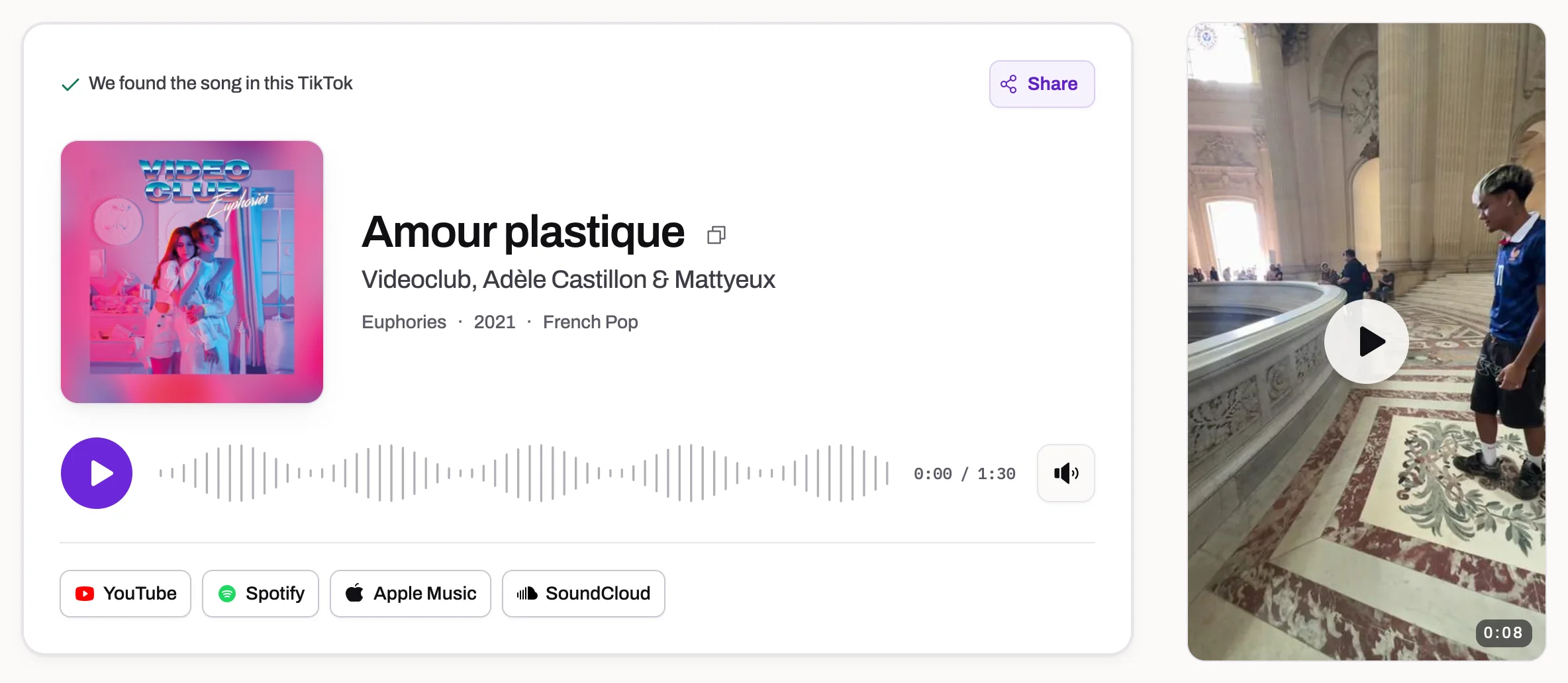
This Paris video uses “original sound”. ClipMelody identified the recording as “Amour plastique” by Videoclub, Adèle Castillon & Mattyeux. Open the result to see the song details and listening links.
View this TikTok resultBuilt for the way TikTok uses music
TikTok sound finder for “original sound” videos
Creators often re-upload a real song as their own sound. We listen to the audio itself, so the track is usually found anyway.
Recognizes some edited recordings
Some sped-up, slowed and lightly remixed recordings can match. Larger changes in speed, pitch or effects may prevent recognition.
Shows the platform label too
When TikTok names the sound, we show that label next to the song we heard — handy when the two disagree.
No TikTok account, no app
Use your phone, tablet or computer — everything runs in your browser, with no app to install. Finding the song is free.
Short links and full links
vm.tiktok.com share links and full tiktok.com/@user/video addresses both work, so paste whatever the Share button gave you.
Popular clips answer instantly
A TikTok someone has already identified opens straight away, so a viral sound is usually answered before you finish pasting.
Still looking for a song behind “original sound”? Try four ways to find a song from a TikTok original sound, from checking the sound page and comments to identifying the audio.
When a TikTok sound label isn't enough
“Original sound” names an upload, not always a song
A TikTok sound page can group videos using the same uploaded audio without naming the recording inside it. The uploader's username, a joke or a phrase from the video may appear where you expected a song title. Start by opening that sound page: a real title may already be there. If it isn't, the caption, pinned comment or creator's replies can offer a useful lead.
ClipMelody checks the music in the video's own soundtrack. That matters when a creator has combined a released song with speech or uploaded an edited clip as “original sound”. The Paris example above returned Amour plastique, even though the platform label did not give that title. It shows how a label and an identified recording can differ; another video still needs enough recognizable music to match.
Check which version you are hearing
Sped-up edits, slowed versions and remixes can change the sound of a familiar recording. Some remain recognizable, while large changes in speed or pitch, heavy effects and mashups may prevent a match. The answer may also point to the original release rather than the particular edit used on TikTok. Treat the artist and title as a lead to compare with the video.
After a match, listen to the available preview and search your music service for that artist and title. If the tempo differs, look for a separately released version using terms such as “sped up” or “slowed”. A similar melody does not make two recordings identical: a live cover, a rerecording or an unreleased performance may need a different source, or may have no catalogue match.
Separate an inaccessible link from a missing match
If the video cannot be opened, check that you copied a single TikTok post and that it is still public. A clip visible inside your signed-in app may be private, removed or otherwise unavailable to an outside service. Copy the link again from the post's Share menu. A profile link or a sound-library page does not identify the particular video you want us to hear.
If you already have the clip saved, upload its video or audio file instead. Play the file first to check that the soundtrack is present, then choose a section with clear music. A no-match result means the audio was checked without finding a recording; it is different from being unable to fetch the video. A no match and a failed run cost nothing.
If the first attempt gives no answer
Listen for a passage where speech, transitions and sound effects leave the song exposed. A longer file is not automatically better: a short, clear section can be more useful than an entire video with several sounds. Avoid repeatedly submitting the same unchanged clip. If you can obtain a clearer section, trim it and upload that version, keeping enough continuous music to hear the rhythm and melody.
You can also check another post using the same sound, read comments asking for the title, or search a few clearly heard lyrics. These clues are especially useful for unreleased creator audio that fingerprinting cannot name. Once you find the recording, save the result link or add the track to a playlist so you can return to it without retracing the original TikTok.
TikTok song finder FAQ
What song is this TikTok using?
Open the video, tap Share → Copy link, then paste the link above. ClipMelody listens to the video's audio and names the song.
Why does TikTok say “original sound” when it's clearly a real song?
The uploader created their own sound from the clip instead of picking the track from TikTok's library. The music is still there, which is what we identify.
Can I find a song from a TikTok slideshow?
Yes — a photo slideshow's soundtrack is identified the same way. Paste its link like any other video.
What if the TikTok is private or deleted?
We can only listen to public videos. If you saved the video, upload the file instead.
Is it free?
Finding the song is free; seeing its name uses one credit — packs start at $2.99 for 100 songs.
How does a TikTok song finder work?
It takes a 12-second clip of the video's audio, turns it into a fingerprint and compares that with a catalogue of tens of millions of recorded songs. The match comes from the sound itself, so the caption and the sound label don't matter.
I only have the video file, not the link. What now?
Upload it instead. MP3, M4A, WAV, MP4, MOV and WebM files work, and so does a screen recording as long as it has sound.
Will it find a song that only exists on TikTok?
Usually not. We match released recordings, so a sound that was made on TikTok and never released has nothing to match. No credit is used when nothing is found.
How long does it take?
Usually 5–20 seconds. A TikTok that someone has already identified opens instantly.
How do I listen to the whole song?
After a match, tap Spotify, Apple Music or YouTube under the result to open a search for the song there, then pick the right track to play or add to a playlist.
Can I download the song after finding it?
ClipMelody identifies the song and provides links to search for it on Spotify, Apple Music or YouTube. It doesn't provide MP3 downloads. For offline listening, check the options in your music app.
Find the song in that TikTok
Paste a TikTok link and press the arrow.
Free to find · no app · no TikTok account